
UI/AI in the Enterprise: AI-Driven UI/UX Best Practices for Customer Experience
Table of Content
- Introduction
- Why AI-Driven UI/UX Matters for Modern Enterprises?
- 5 UI/AI Best Practices for Enterprise-Grade User Experiences
- How MultiQoS Helps You With UI/AI Solutions?
- FAQs
Summary:
In 2026, businesses will change how they create their online experiences. Traditional UI/UX designs are secure, but they are too slow to keep up with product scaling. Manual design cycles, flat user journeys, and laborious review processes still prevail in teams, create tension, dilute the experience, and create an unequal customer experience.
AI-driven UI/UX changes this. Personalization and forecasting interfaces in real time, automated access, and AI-based design systems can help organizations create faster, easier-to-use, and platform-consistent experiences. AI allows companies to automate design, eliminate UX bottlenecks, launch products faster, and improve customer journey experiences.
The author of this article breaks down the best practices of the leading UI/AI in 2026 that are valuable to all product teams in enterprises, startup founders, and design leaders. But that is not possible until we understand the meaning of UI/AI.
Introduction
What if there were a user interface that adapts to every sales opportunity, helping you convert more easily with personalized insights? Salesforce leveraged a UI/AI approach to build the “Next Best Action” UI. Such an interface provides AI-recommended behavior, value highlighting, and instructions for what sales representatives should do to achieve higher conversion rates.
Like Salesforce, you can leverage AI-driven design to deliver a personalized user experience. However, complex workflows, fragmented design systems, and UX delivery remain issues for most teams. This leads to wasted time, a humiliating design, and a poor user experience.
And here the AI-based UI/UX comes in.
One should not only be aware that AI can be applied to improve design. The design teams, CTOs, and product leaders must understand the real impact of UI/AI on the customer experience. Plus, understanding how AI functionality aligns with existing workflows and use cases is essential.
This guide takes you through the most fundamentally essential practices of UI/AI that are changing enterprise UX in 2026, with insights and examples that you can start using today.
However, before we get into that, it is crucial to know the reason behind the importance of UI/AI and why it is a strategic priority.
Why AI-Driven UI/UX Matters for Modern Enterprises?
Modern enterprises can leverage UI/AI capabilities to build interfaces tailored to specific user patterns and trends. This allows enterprises to offer highly personalized services and a predictive experience. Designers and enterprises often deal with challenges such as:
- Slow design iteration cycles
- Lack of consistency across multi-team, multi-platform environments
- Difficulty scaling UX patterns across large enterprise systems
- Fragmented insights into how users behave and where they struggle
UI/AI helps solve these problems by enhancing, not replacing, human-centered design.
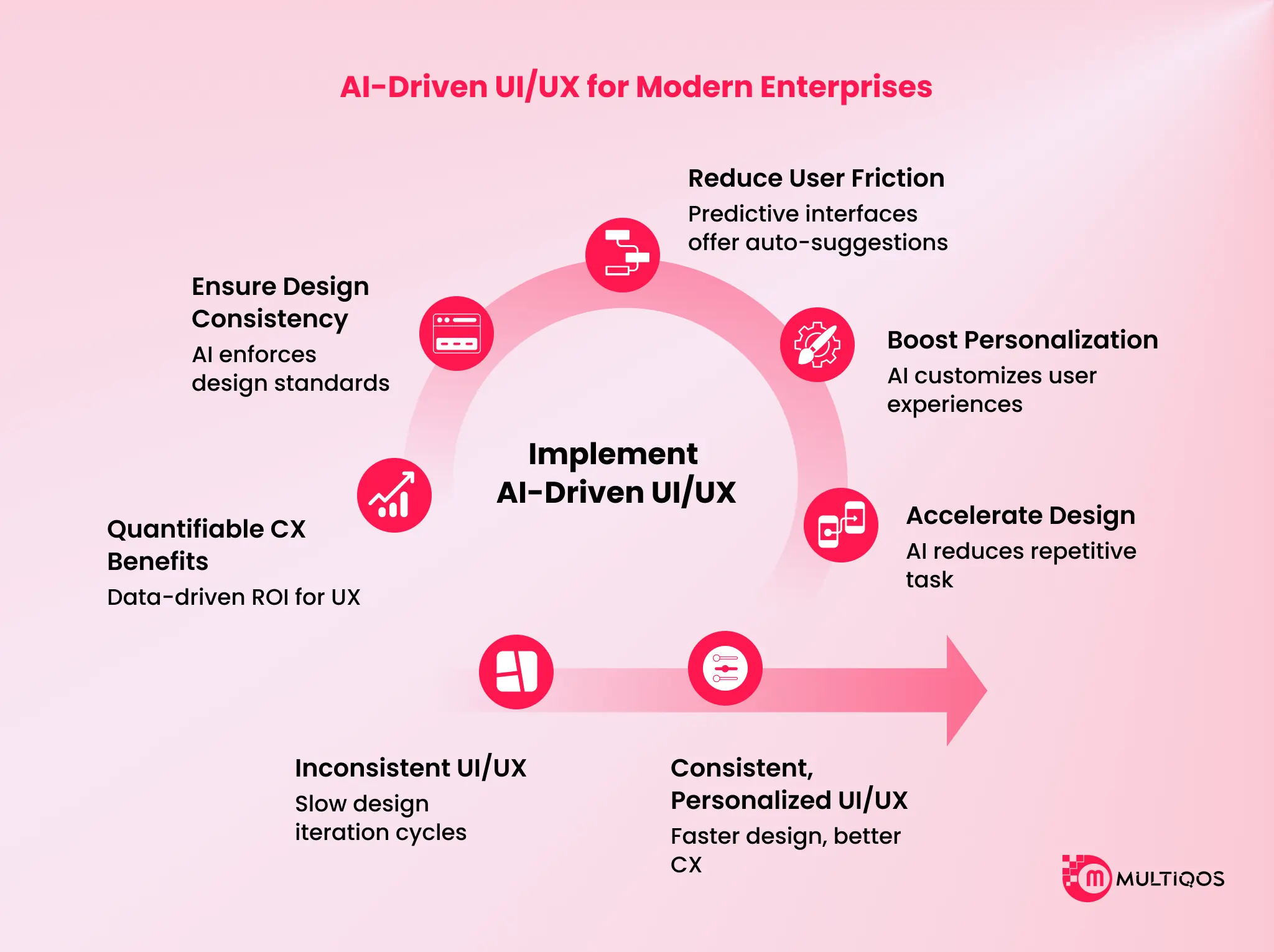
Accelerates Design Cycles
AI reduces repetitive design tasks, generating layouts, identifying usability issues, and suggesting improvements. This shortens time-to-release and removes traditional bottlenecks. Take the example of Netflix. The streaming giant uses a UI/AI approach to update their thumbnails for a movie. What this means is the thumbnails are personalized based on user profiles.
Using an AI-driven design approach, it reduces the time needed to create personalized thumbnails for users across categories.
Boosts Personalization & Product Adoption
Contemporary products exist in customized experiences. Enterprises need to understand the importance of UI/UX personalizations and leverage AI for hypercustomizations. AI customizes dashboards, workflows, and suggestions based on user actions. This enhances user interaction, and when you consider the case of the AI DJ on Spotify, it uses UI/AI to the fullest extent. It is like the experience of a live radio station, personalized for users.
Reduces User Friction
Predictive interfaces use UI/AI to offer auto-suggestions, smart guidance, and anticipatory actions. This streamlines complex enterprise tasks, reducing cognitive load. Take an example of the Arc Search. It uses AI to read the top 6 websites for any user search and generate a brand new webpage for users. This is in contrast to Google, which shows a list of links.
Ensures Design Consistency At Scale
Companies usually find it challenging to maintain UI after an extended team of staff, existing systems, and hundreds of online points of contact. Design systems powered by AI are comparable to a centralized governor, which will enforce standards to reduce design debt by auditing components automatically.
Consider the case of Adobe Firefly Enterprise. It enables distributed marketing and design teams to produce new visual assets that automatically conform to the specific style guide of the brand. The AI also ensures that all generated images and layouts follow the company’s color palette and typography to the letter, practically eliminating the so-called brand drift prevalent in large corporations.
Provides Quantifiable CX Benefits.
The UX based on AI is changing the subjective views of design to objective and data-driven ROI. Real-time user interaction patterns are used to detect signs of frustration, such as rage clicks or loop behavior, and immediate solutions are provided to accelerate the completion of tasks by AI.
Take the example of Klarna. The fintech giant used an AI-driven chat used in its Customer Service Interface, which responded to two-thirds of all chats within the first month. This led to an enormous CX boost, reducing the average time to address the issue to only 2 minutes.
This demonstrates that AI-based UI directly drives efficiency and customer satisfaction. Similarly, you can leverage AI in customer service and support through advanced UI/UX design, as seen with Klarna. Having defined the value, we can move on to the best practices that influence the adoption of enterprise UI/AI.

5 UI/AI Best Practices for Enterprise-Grade User Experiences
UI/AI makes the design process easier, helps people make better decisions, and makes things easier to use than they were a few years ago.
Here are five best practices that will have a significant effect right away.
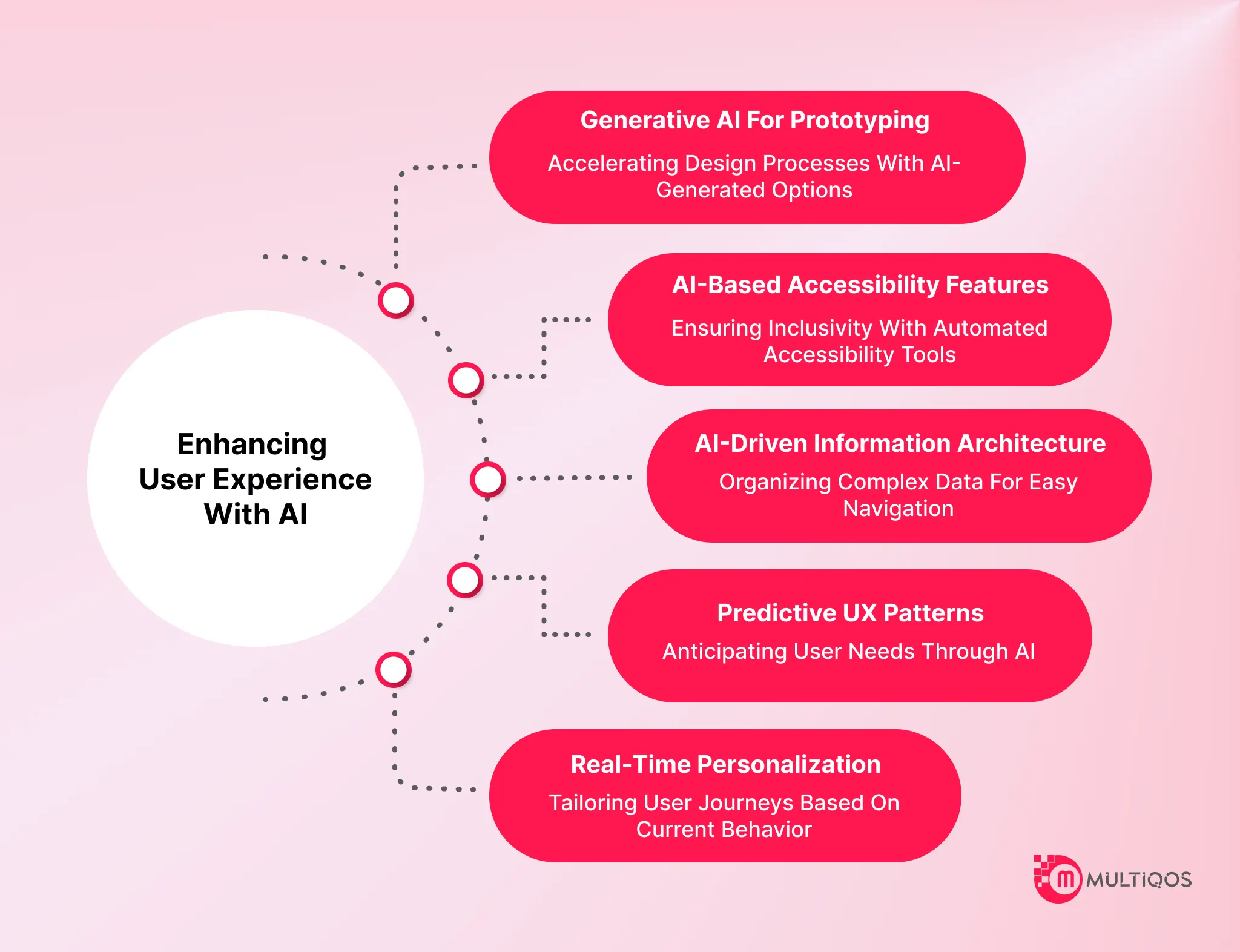
1. Change User Journeys In Real-Time
Enterprise users don’t behave the same way as static user flows do anymore. Real-time personalization helps make:
- Dashboards
- Workflows
- Suggestions
- Paths for navigation
One important thing to remember is that Ui/UX personalization should align with privacy policies, governance rules, and the limits of business data.
2. Use Predictive UX Patterns
Predictive experiences know what users need before they do anything. Some of these patterns are:
- Search that makes predictions
- Suggestions for the next best action
- Completing tasks automatically
- Prompts that know what’s going on
3. Use AI For Information Architecture
Many pages, modules, or workflows are common in large business apps. It gets too hard to navigate.
AI helps reorganize complicated information architecture by:
- Semantic grouping
- Tagging automatically
- Smart grouping
- Reorganizing navigation based on behavior
This makes sure that users can quickly find what they need without having to dig through a lot of menus.
4. Add AI-Based Accessibility Features
It’s hard to make things accessible for many people, especially when product teams make changes every week.
- AI makes it easier to follow accessibility rules by giving
- Alt text that is made automatically
- Changes to the contrast
- Support for voice navigation
Font size changes automatically based on what the user needs. This helps businesses remain open to everyone without overstraining design resources.
5. Use Generative AI To Make Prototypes And Layout Changes Faster.
Prototyping often takes weeks of manual work. Your teams can quickly make different design versions with generative AI. You can leverage custom generative AI development services to build prototypes quickly and leverage a lean startup approach.
For instance:
- Several different layout options
- Suggestions for automated microcopy
- Instant creation of wireframes
- Different ways to test user flow
This helps designers review their ideas before development begins and speeds decision-making. Designers can leverage generative AI tools to enable rapid prototyping and flexibility for quick changes.
How MultiQoS Helps You With UI/AI Solutions?
Knowledge of the best practices of UI/AI is not just the beginning. Actual change means being aligned with business objectives and leveraging the appropriate technical skills. This is where MultiQoS assists companies that have a balanced combination of design, engineering, and AI capabilities. Having experience in international business and having a solid background in the areas of AI/ML, Microsoft ecosystems, and UX modernization, MultiQoS assists teams in:
- Develop scalable AI-based design systems.
- Streamline user interfaces with adaptive and predictive user interfaces.
- Provide user-oriented solutions supported by results.
Contact us now for an AI-driven design roadmap for your enterprise.
FAQs
It is the use of AI to streamline UI/UX through personalization, intelligent automation, predictive analytics, and scalable design systems.
Onboarding, reporting, search, dashboards, and modules are heavy on navigation and multistep enterprise activities.
Yes, unless AI models conflict with governance, privacy, explainability, and compliance systems.
No. It also multiplies designers’ efforts, with the added benefit of reducing repetitive work and speeding up iteration.
The success, activation, engagement, CSAT, NPS, and reduction in the support ticket rate.

Get In Touch

Get Stories in Your Inbox Thrice a Month.
AI E-Commerce Personalization: Creating Customer Experiences That Convert
The Future of AI for Customer Experience: How to Build Predictive Customer Journeys
Why Adaptive UI/UX for Enterprise Apps Matters More Than Ever?

