AI in Software Development For B2B Businesses: 7 Production-Ready Use Cases
Table of Content
- Why AI Adoption in B2B Software Development is Different?
- Why AI Finally Feels Practical for B2B Teams?
- AI Coding Assistants in Modern Product Development
- 7 Practical Ways Product Teams Are Using AI in 2026
- Bringing AI into B2B Software Teams Without Regretting It Later
- How MultiQoS Helps B2B Companies with Expert AI Software Development?
- FAQs
Summary
For B2B software development in 2026, the era of experimental AI is over; the focus has shifted to integrating production-ready systems that respect the strict compliance, stability, and legacy requirements of enterprise environments. This article explores seven high-impact use cases, from context-aware coding assistants and self-healing QA to AI-driven security reviews, that go beyond simple automation to deeply enhance architectural integrity and operational workflows.
By moving past “speed at all costs” to a strategy of disciplined adoption with proper guardrails, product teams can leverage AI to modernize legacy systems and drive revenue-linked roadmaps without compromising the critical reliability that B2B businesses depend on.
Nearly every organization is experimenting with AI in software development. But far fewer are turning those experiments into production-ready, scalable systems.
For a long time, AI in enterprise software felt optional. Interesting. Strategic. Something to plan for. That window has closed. The pressure to move faster and operate smarter has made adoption feel urgent, especially in B2B.
The catch is that B2B systems are not playgrounds. They run on deep integrations, compliance requirements, and long-term stability. You cannot just plug in a tool and hope for the best. Making AI work here means embedding it into the architecture carefully, without compromising the systems that keep the business running.
This article provides you with the best use cases of AI software development for 2026. But first, let’s explore why AI in software development for B2B businesses differs from other applications.
Why AI Adoption in B2B Software Development is Different?
When it comes to B2B business, the endeavor should be to achieve additional stability, integration, and compliance standards. This is unlike consumer apps, which are focused on speed and newness. B2B software development is restricted in a few ways, though, such as
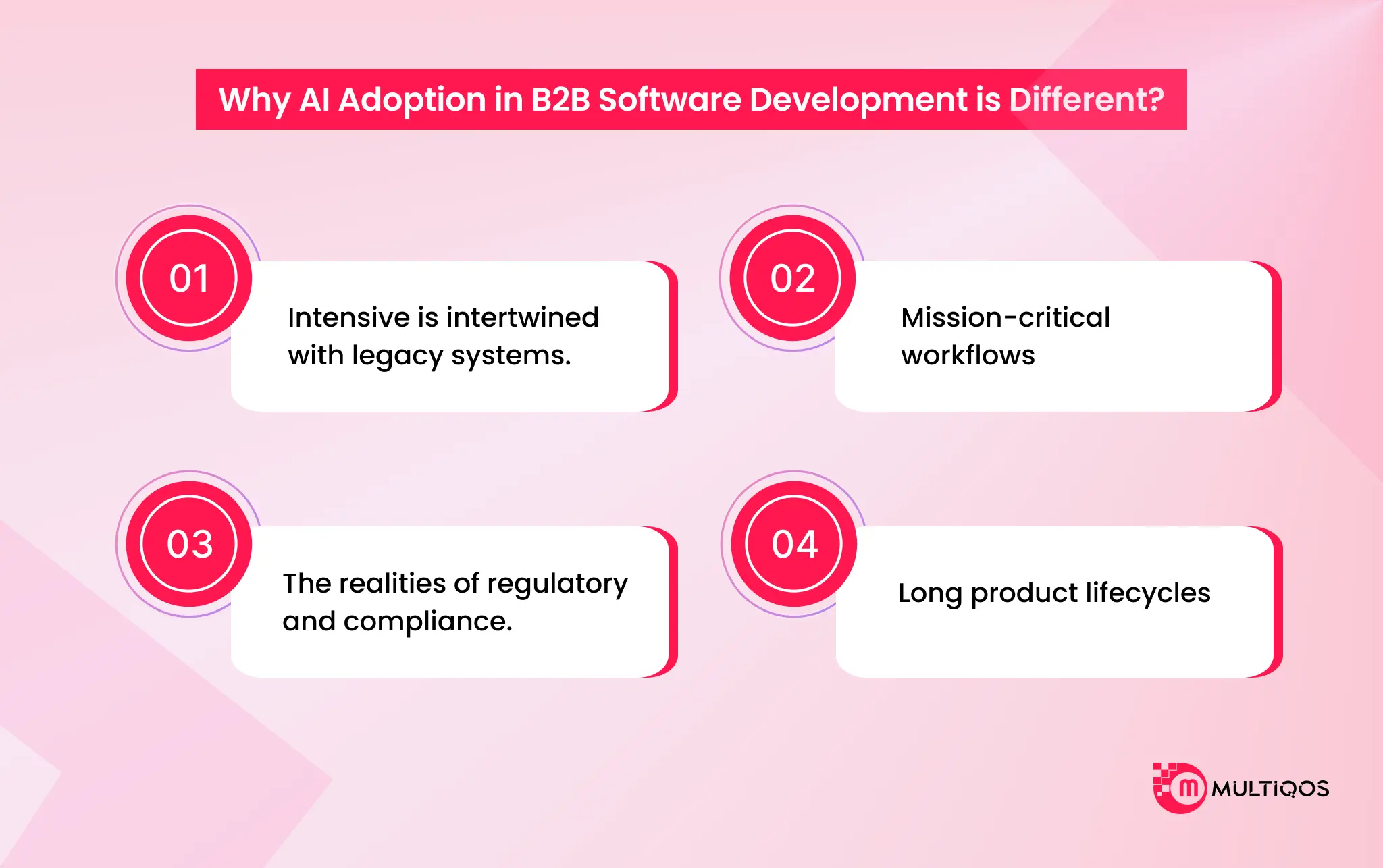
Intensive is intertwined with legacy systems.
When you have worked within enterprise systems, you are largely dealing with layered and re-layered software over a period of years. And such an overlay strategy brings giant monuments and ancient structures. Code in languages that the younger developers have never seen.
Mission-critical workflows
In the B2B, there is no freedom from error. It is not a glitch in the consumer app that bothers a few users. An ineffective deployment may stop business, violate contracts, or spread across a supply chain. This is the reason that the level of tolerance to experimentation is reduced. When an AI assistant is proposing a false dependency, mentioning an object that is not actually there, or silently causing a security vulnerability, the effect is not abstract. It’s operational.
The realities of regulatory and compliance.
The vast majority of the enterprise software exists under a regulatory umbrella of SOC 2, HIPAA, GDPR, and industry-specific standards. Those needs do not evolve simply because a new tool makes their development quicker. It is impossible to ship an element that is saving engineering time when it introduces audit gaps or sensitive information. Such a trade-off is just not acceptable.
Long product lifecycles
Enterprise platforms are not hype cycle-friendly. They’re built to last. Five years. Ten years. Sometimes longer.
That alters your way of thinking speed. In the short term, it is pleasant to move fast. Only to find that it leaves behind a haphazard abstraction and lapsed changes that people will have to pay for. AI is able to assist in faster development.
However, when it also increases technical debt as fast as it can, you have not really earned anything.
AI must enhance discipline and not substitute it.
Why AI Finally Feels Practical for B2B Teams?
For years, most B2B teams were circling the idea of AI adoption and running pilots. Giving a few developers access. Letting marketing test a copilot and building internal demos that looked impressive in slides, and then quietly shelving them.
The problem was not that AI could not generate output. It was that nothing around it was stable enough to trust. The tools felt unfinished. Security teams were nervous. Infrastructure was not wired for it. So everything stayed in experimental mode.
That is what changed.
From Helpful to Operational
The first wave of AI tools was impressive, but shallow. They drafted emails. Suggested code. Cleaned up documentation. Essentially, a smart autocomplete. Helpful, yes. Transformational, not really.
We are now seeing AI systems that can execute defined workflows. Not just suggest next steps, but complete them.
- They qualify inbound leads based on scoring rules.
- They triage support tickets and route them correctly.
- They review pull requests and flag architectural issues.
- They summarize customer histories before an account review call.
And they do it without someone supervising every step.
In many B2B teams, AI now handles a significant portion of repetitive work. Not because it is perfect, but because it is properly scoped and connected to real systems.
Context Was Always the Real Problem
If you were part of early AI rollouts, you likely saw this firsthand. The output looked polished but slightly off. Over time, that mismatch created subtle errors. Small inconsistencies compounded. Teams described it as drift. There were no better prompts. It was a better context.
With retrieval-based systems, repository indexing, and structured integrations, AI can now reference internal documentation, legacy codebases, and customer records before generating responses.
Governance Is No Longer the Showstopper
Security used to be the wall. Legal teams hesitated. Compliance pushed back. Leadership worried about data exposure and unpredictable behavior. Those concerns were valid.
Early AI tooling was not designed for enterprise scrutiny. Now governance is built in from the start. Monitoring tools track code integrity and dependency risks. Model behavior can be audited. Compliance standards such as SOC 2 and GDPR are considered during deployment planning, not added later.
So What Actually Changed?
Not intelligence alone.
- The ecosystem matured.
- Integrations deepened.
- Guardrails solidified.
Teams learned where AI creates measurable efficiency and where it does not. That is why B2B product teams are no longer just testing AI. They are designing their operating model around it. But how does it help with modern product development?
AI Coding Assistants in Modern Product Development
AI coding assistants have become a foundational layer in AI in software development in 2026. They are no longer simple autocomplete tools. Modern systems analyze repositories, understand architectural patterns, and align output with existing coding standards. For product teams, this means faster execution without compromising structure.
What Makes AI Coding Assistants Different Today?
Earlier tools predicted the next line of code. Today’s AI coding assistants understand:
- Your full repository structure
- Internal documentation and conventions
- Dependency relationships
- Security patterns and linting rules
This shift has made AI for developers far more practical. Instead of generating isolated snippets, these tools now produce context-aware code that fits enterprise environments.
How AI Coding Assistants Improve AI in Product Development
In the AI in product development era, speed is not the objective. The consistency and scalability are equally important. AI coding assistants assist teams:
Quicken Feature Development.
They produce CRUD layers, APIs, validation code, and boilerplate frameworks within minutes. Architecture and business logic are considered by the developers rather than repetitive scaffolding.
Modernize Legacy Systems
Layered monoliths are used by numerous B2B companies. Software development assists developers in refactoring old modules one by one at a time, which is less risky than rewriting old code.
Enhance Standards and Fidelity.
The AI coding assistants propose suggestions based on the repository patterns. This lessens architectural change and imposes internal requirements on distributed work units.
Code Reviews Can Be Smarter.
With more sophisticated processes, AI is the initial reviewer. It identifies security concerns, dependencies, and inconsistencies in logic at a stage prior to human scrutiny. Viewer. It flags security issues, dependency vulnerabilities, and logic inconsistencies before human review begins.
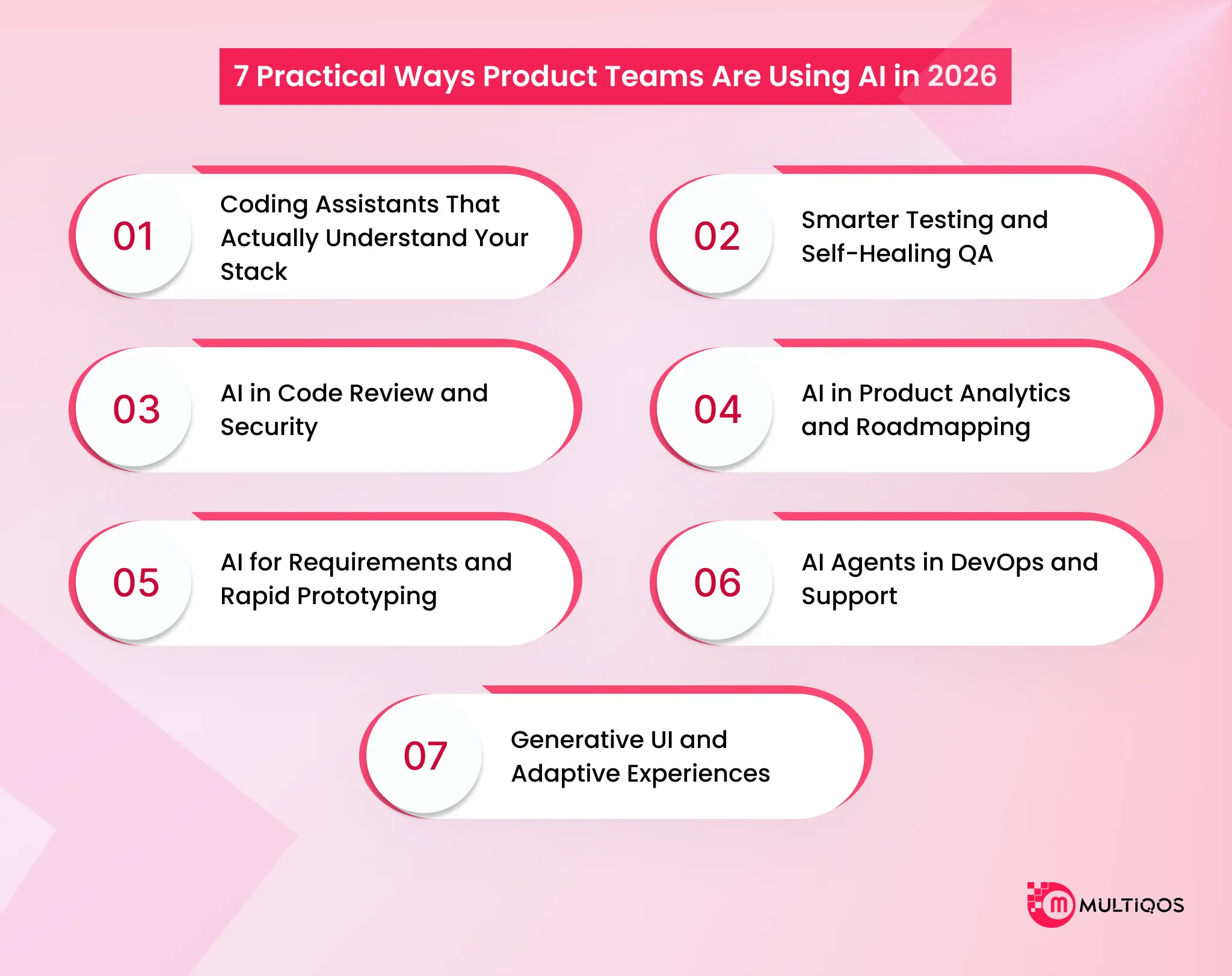
7 Practical Ways Product Teams Are Using AI in 2026
A few years back, AI lived in side tabs. Developers used it for quick snippets. PMs asked it to clean up the documentation. Designers played with prototypes. It was interesting. Occasionally helpful. But it was disconnected from how work actually flowed.
That is no longer the case. AI now appears throughout the entire product lifecycle. It is embedded inside systems teams already use. And expectations are higher. No one gets points for simply “adopting AI.” Leadership wants a measurable impact.
Here are seven use cases that are delivering real value right now. Some are mature and low risk. Others are powerful but need careful rollout.
1. Coding Assistants That Actually Understand Your Stack
AI coding assistants have evolved over the years. They are no longer just predicting the next line. The stronger tools now analyze your repository, understand existing patterns, and generate code that fits your architecture instead of fighting it.
Where this shows the most impact:
- Generating boilerplate, CRUD layers, repetitive data structures, and migrations.
- Helping teams modernize legacy systems through controlled sprints rather than massive rewrites.
- Suggesting changes that align with how your codebase is already structured.
Take an example of Jack Dorsey’s fintech firm Block, which built an internal AI agent called “Goose.” It assists engineers with coding, debugging, and rapid prototyping. This AI agent acts as a developer co-pilot in hackathons and product workflows
2. Smarter Testing and Self-Healing QA
Testing has always been where schedules break. Scripts fail when small UI elements change. Regression suites take forever. Data setup becomes a bottleneck. ‘
AI has made this less painful. Self-healing tests adjust when selectors or minor interface elements shift. Synthetic datasets allow teams to test edge cases without touching production data. Predictive models identify which parts of the system are high risk, so you do not need to run everything for every change.
3. AI in Code Review and Security
As the volume of AI-generated code increases, human review capacity does not scale at the same rate. AI now acts as the first reviewer. It checks for architectural drift, flags deviations from internal patterns, and identifies common security risks before a human reviews the pull request.
Security scanning tools are integrated directly into development environments. They catch risky dependencies, exposed credentials, and weak authentication patterns early. But there is a boundary here. AI can detect inconsistencies. It cannot explain long-term architectural intent. That still belongs to experienced engineers.
4. AI in Product Analytics and Roadmapping
Previously, roadmaps were the result of an executive urge, the loudest client, or an executive push. AI is altering the prioritization process of feedback to be revenue and churn-risk-connected. The teams will examine the people who requested a feature, their payment, and the consequences of not responding, instead of asking how many people requested it.
Striking themes of sales calls, support calls, and usage data are also pulled by AI. This enables product teams to be results-oriented rather than feature-oriented. Reduce onboarding friction. Improve expansion revenue. Shorten the time to value.
5. AI for Requirements and Rapid Prototyping
The distance between idea and prototype has shortened dramatically. Product managers can turn rough notes or sketches into structured drafts in minutes. Engineers can quickly generate working front-end scaffolding to test assumptions before committing serious effort. Some teams lean into natural language guidance to shape UI behavior and interaction patterns. It speeds iteration, especially early in discovery.
6. AI Agents in DevOps and Support
Internal processes are often where AI delivers the cleanest ROI. Custom AI Agents can summarize incidents by pulling from logs, tickets, and team conversations. That reduces resolution time significantly. Support systems use AI to accurately categorize and route tickets. Routine questions can be handled automatically, while complex cases escalate properly. Insights from those interactions feed back into product planning.
Take an example of Cadence’s “ChipStack AI Super Agent.” It accelerates chip design workflows automating design exploration, testing, and debugging tasks that once consumed engineering time.
7. Generative UI and Adaptive Experiences
B2B interfaces are becoming more dynamic. Instead of static dashboards, systems assemble views based on user intent and context. A sales leader might see performance gaps. An auditor might see compliance signals. Same system. Different presentation logic.
The promise is personalization at scale. The risk is inconsistency and design drift. Teams counter this by anchoring dynamic behavior to structured design systems and automated checks. Without that, interfaces quickly become unpredictable. This is where you can leverage expert generative AI development services for optimal adaptiveness.
Bringing AI into B2B Software Teams Without Regretting It Later
Introducing AI into a B2B engineering team is not some innovation lab exercise. It is not about being the first to try a shiny new tool. In enterprise software, “safe” goes way beyond data privacy. It is about protecting systems that businesses rely on every single day.
These platforms carry years of architectural decisions, workarounds, and business logic. If AI starts nudging that logic slightly off course or adding layers that do not quite fit, the damage will not show up overnight. It creeps in. And when it surfaces, it is usually expensive to fix.
So if you are going to bring AI in, do it in a way that does not create a cleanup project six months down the line.
1. Start small and earn trust
Trying to flip the switch across the entire organization rarely works. It creates confusion, mixed results, and skepticism. A better approach is to pick one area where the payoff is obvious and the risk is manageable. Documentation that nobody has time to write.
Generating test cases, cleaning up repetitive code, and updating a contained legacy component. Treat it like a focused experiment. Give it a defined time frame. Look at what actually improves instead of assuming it will.
2. Keep experienced engineers in charge
AI can move quickly. That does not mean it should operate independently. In practice, it works best as support. But when something affects databases, infrastructure, permissions, or customer-facing features, someone accountable must still review it carefully. This changes the role of senior engineers. Less focus on typing every line.
More focus on reviewing, validating, and protecting the architecture. It becomes about judgment, not speed and this is where hiring experienced software engineers comes in handy.
3. Give AI real context and guardrails
The wider the context AI has (patterns of the codebase, documentation, existing conventions), the better the output of the AI. Otherwise, you are prone to gradual changes in logic that will gradually move the system out of the intended mode of operation. AI can recommend outdated libraries or insecure packages without realizing it. That is why security checks in your development pipeline matter more, not less, when AI is involved.
4. Do not obsess over speed
It is easy to celebrate faster pull requests and shorter development cycles. But velocity by itself does not tell the whole story. If you are shipping features faster but also increasing bugs, rework, or long-term maintenance, you are not moving ahead. You are just pushing problems forward.
Look at outcomes instead. Did reliability improve? Are customers opening fewer support tickets? Is onboarding smoother? Are deployments more stable? There is also a cost to consider.
How MultiQoS Helps B2B Companies with Expert AI Software Development?
At MultiQoS, we have seen what happens when AI is bolted onto enterprise software without thinking through the consequences. It looks impressive in a demo. It struggles in production. Our approach is simple. We design AI to fit your environment, not the other way around.
From the start, we design AI workflows with proper logging, access controls, and review layers. Sensitive actions require oversight. Data handling follows clear governance rules. You stay audit-ready, not scrambling to retrofit controls later.
We focus on use cases where the impact is clear and the risk is controlled. Intelligent document processing. Predictive insights that improve planning. Automated QA that shortens release cycles without cutting corners. The objective is measurable return, not novelty.
If you are ready to build something that improves performance without sacrificing stability, we are ready to help you do it properly.
FAQs
AI coding assistants do not replace the developers: they are designed to assist them. In the current settings, they transcend mere code recommendations. They are able to read repository context, identify internal patterns, refactor existing logic, and even go through pull requests.
Speed is significant in product teams. AI coding assistants are used to assist in speeding up feature delivery by creating boilerplate code, proposing optimizations, and aiding with automated testing workflows.
No. They make productivity more efficient; however, they do not deprive experienced engineers. The decisions made in architecture, validation of compliance, review of security, and accountability at the production level remain at the human level. AI can assist with execution. It is still the responsibility of the team.
Adoption is a matter that needs to be structured. Governance policies, repository access control, in-built security scanning, and established review processes are all relevant.

Get In Touch

Get Stories in Your Inbox Thrice a Month.
AI E-Commerce Personalization: Creating Customer Experiences That Convert
The Future of AI for Customer Experience: How to Build Predictive Customer Journeys